Wednesday, 14 May 2014
Tuesday, 6 May 2014
Bob Buzzard Blog: Reading Barcodes in Salesforce1
Bob Buzzard Blog: Reading Barcodes in Salesforce1: A little over a month ago I wrote a post on Reading QR Codes in Salesforce1 . At the time I added an entry to my todo list to investigate ba...

Monday, 5 May 2014
Handle ENTER event key press in visual force page
Handle ENTER event key press in visual force page OR
Preventing default form submission and calling an action instead
Preventing default form submission and calling an action instead
<apex:page standardController="account" >
<script type="text/javascript">
function submitListener(e){
var keynum = 0;
if (window.event){
keynum = window.event.keyCode;
}
else if (e.which){
keynum = e.which;
}
// Here we check whether the Enter button was pressed
if (keynum == 13){
onFormSubmit();
}
}
<script type="text/javascript">
function submitListener(e){
var keynum = 0;
if (window.event){
keynum = window.event.keyCode;
}
else if (e.which){
keynum = e.which;
}
// Here we check whether the Enter button was pressed
if (keynum == 13){
onFormSubmit();
}
}
</script>
<apex:form id="orderSearchForm" onkeyup="submitListener(event)">
<apex:actionFunction
name="onFormSubmit" action="{!save}"
/>
<apex:pageBlock title="View
AND Edit">
<apex:pageBlockButtons >
<!-- --> <apex:commandButton
action="{!cancel}" value="Cancel"/>
<apex:commandButton
action="{!save}" value=":-)" />
<apex:commandButton action="{!cancel}"
value="Cancel"/>
</apex:pageBlockButtons>
<apex:pageblockSection columns="2">
<apex:pageblockSection
columns="1">
Name: {!account.name}
</apex:pageblockSection>
<apex:pageblockSection
columns="1">
<apex:inputField value="{!account.name}" />
<apex:inputField value="{!account.type}" />
<apex:inputField value="{!account.industry}"/>
<apex:inputField value="{!account.fax}" />
</apex:pageblockSection>
</apex:pageblockSection>
</apex:pageBlock>
</apex:form>
</apex:page>
Wednesday, 30 April 2014
Rendering a page block section based on conditions
set dynamically, Multiple Conditions for Rendered Attribute
set dynamically ,Rendering a page block section based on conditions
/*
Consider one custom object:- A__c
and A__c has fields :- First_Name__c, Last_Name__c, Age__c and Contact_Details__c
Suppose when user opted First then user can see 4 fields but When user opted Second then user can see only two fields.
*/
/*Code for Visualforce (Vf) page*/
<apex:page standardController="A__c" extensions="renderedconditionalcntrl" >
<apex:form >
<apex:pageBlock title="Rederer with condition">
<apex:outputLabel value="My Options"> </apex:outputLabel>
<apex:inputField label="My Option" value="{!Aobj.My_Option__c}">
<apex:actionSupport event="onchange" action="{!changeevent}" status="displaystatus" immediate="false" reRender="c1"/>
</apex:inputField>
<apex:pageBlockSection id="c1" columns="1" collapsible="false">
<apex:pageBlockSectionitem rendered="{! IF( isFirstDiv || isSecondDiv,true,false)}" >
<apex:outputLabel value="First Name"> </apex:outputLabel>
<apex:inputField label="First Name" value="{!Aobj.First_Name__c}" />
</apex:pageBlockSectionitem>
<apex:pageBlockSectionitem rendered="{! IF( isFirstDiv || isSecondDiv,true,false)}" >
<apex:outputLabel value="Last Name"></apex:outputLabel>
<apex:inputField label="Last Name" value="{!Aobj.Last_Name__c}" />
</apex:pageBlockSectionitem>
<apex:pageBlockSectionitem rendered="{!isFirstDiv}" >
<apex:outputLabel value="Age"></apex:outputLabel>
<apex:inputField label="Age" value="{!Aobj.Age__c}"/>
</apex:pageBlockSectionitem>
<apex:pageBlockSectionitem rendered="{!isFirstDiv}">
<apex:outputLabel value="Contact Number"></apex:outputLabel>
<apex:inputField label="Contact Number" value="{!Aobj.Contact_Details__c}"/>
</apex:pageBlockSectionitem>
</apex:pageBlockSection>
</apex:pageBlock>
</apex:form>
</apex:page>
/*Code for Apex class (extensions)*/
public with sharing class renderedconditionalcntrl {public boolean isFirstDiv{get;set;} //first flag
public boolean isSecondDiv{get;set;} //second flag
public A__c Aobj{get;set;}
public renderedconditionalcntrl(ApexPages.StandardController controller) {
Aobj = new A__c();
}
public void changeevent(){
System.debug('~~~~~~~~~~~~~~~~~~~~~' + Aobj.My_Option__c );
//Set your flag
isFirstDiv = false;
isSecondDiv = false;
if(Aobj.My_Option__c == 'First')
isFirstDiv = true;
else if(Aobj.My_Option__c == 'Second'){
isSecondDiv = true;
}
else {
isFirstDiv = false;
isSecondDiv = false;
}
}
}
Refer following Images for the above implementation :-


Tuesday, 18 February 2014
Salesforce: Salesforce - "System mode & User mode" and "With s...
Salesforce: Salesforce - "System mode & User mode" and "With s...: This topic has always been part of discussion where the answer is not satisfactory and convinced to others. Using this article, I wi...
Tuesday, 4 February 2014
SFDC 401 notes: Get Started for SFDC 401
SFDC 401 notes: Get Started for SFDC 401: 1) For a Contact object, All users should be able to see all the fields except User Y who should net be able to see Mobile No. Field. This ...
Monday, 3 February 2014
Batch Apex in salesforce
/* you need to create a class and to schedule that class write one more class
*/
global class batchAccountUpdate implements Database.Batchable <sObject>
{
global Database.QueryLocator start(Database.BatchableContext BC)
{
String query = 'SELECT Id,Name FROM Account';
return Database.getQueryLocator(query);
}
global void execute(Database.BatchableContext BC, List<Account> scope)
{
for(Account a : scope)
{
a.Name = a.Name + 'L';
update a;
}
}
global void finish(Database.BatchableContext BC)
{
}
}

*/
Class Name:- batchAccountUpdate
global class batchAccountUpdate implements Database.Batchable <sObject>
{
global Database.QueryLocator start(Database.BatchableContext BC)
{
String query = 'SELECT Id,Name FROM Account';
return Database.getQueryLocator(query);
}
global void execute(Database.BatchableContext BC, List<Account> scope)
{
for(Account a : scope)
{
a.Name = a.Name + 'L';
update a;
}
}
global void finish(Database.BatchableContext BC)
{
}
}
// to schedule class: - scheduleExpireNotify
global class scheduleExpireNotify implements Schedulable
{
global void execute(SchedulableContext sc)
{
batchAccountUpdate en = new batchAccountUpdate();
Database.executeBatch(en);
}
}
{
global void execute(SchedulableContext sc)
{
batchAccountUpdate en = new batchAccountUpdate();
Database.executeBatch(en);
}
}
Sunday, 2 February 2014
Inline Editing using Visualforce page
<apex:page standardController="Merchandise__c" recordSetVar="acts">
<apex:form >
<apex:pageBlock title="Merchandise">
<apex:pageblockTable value="{!acts}" var="a">
<apex:column value="{!a.name}"/>
</apex:pageblockTable>
// code for inline Editing
<apex:inlineEditSupport event="ondblclick" showOnEdit="saveButton, cancelButton" hideOnEdit="editButton"/>
</apex:pageBlock>
</apex:form>
</apex:page>
<apex:form >
<apex:pageBlock title="Merchandise">
<apex:pageblockTable value="{!acts}" var="a">
<apex:column value="{!a.name}"/>
</apex:pageblockTable>
// code for inline Editing
<apex:inlineEditSupport event="ondblclick" showOnEdit="saveButton, cancelButton" hideOnEdit="editButton"/>
</apex:pageBlock>
</apex:form>
</apex:page>
Wednesday, 29 January 2014
Analytic Snapshot in salesforce
Analytic Snapshot in salesforce
Salesforce Help defines Analytic Snapshots ,it allowed you to load data from a Custom Report to a Custom Object on a regularly scheduled basis
/*
Need to Create Custom object to store data from report,
e.g create an object AKG__AnalyticalSnapshot__c
Create fields on same object to map report fields ,datatype for report field and custom object must be same.
You can create Analytic Snapshot only for Tabular and Summary type report.
*/
Step 1 :- Click on Setup ==> Data Management ==>Analytic Snapshots
Click on New Analytical Snapshot button
Step 2 :- Enter all required information
Click on New Analytical Snapshot button
Step 2 :- Enter all required information

Step 3:- Field Mappings

Step 3 :- Schedule Analytic Snapshot

Tuesday, 28 January 2014
Save point and Rollback in salesforce
/*
Consider two objects:- AKG__trans1__c and AKG__trans2__c
and AKG__trans1__c has field :- Amount (AKG__tr1Amount__c) field and
AKG__trans2__c has field :- AKG__tr2Amount__c
Suppose AKG__tr2Amount__c is depends on AKG__tr1Amount__c field, and if AKG__tr1Amount__c is null then it will be roll back insert query on AKG__trans1__c.
*/
/*------------------------- VF page Code -------------------------------------*/
<apex:page controller="savepointRollbackCon" tabStyle="Account">
<apex:pageMessages />
<apex:form >
<apex:pageBlock title="Transaction 1" >
<apex:pageblockbuttons >
<apex:commandButton value="SAVE!!" action="{!savemethod}"/>
</apex:pageblockbuttons>
<apex:pageblocksection title="Insert Trans1">
<apex:inputField label="Name" value="{!trans1obj.Name}"/>
<apex:inputField value="{!trans1obj.tr1Amount__c}"/>
</apex:pageblocksection>
</apex:pageBlock>
</apex:form>
</apex:page>
/*-------------------------------controller Code ---------------------------*/
public with sharing class savepointRollbackCon {
public AKG__trans1__c trans1obj{get;set;}
public AKG__trans2__c trans2obj{get;set;}
public savepointRollbackCon(){
trans1obj = new AKG__trans1__c();
trans2obj = new AKG__trans2__c();
}
public void savemethod(){
//Declare Savepoint
Savepoint sp = Database.setSavepoint();
insert trans1obj;
try{
trans2obj.Name= trans1obj.name;
trans2obj.tr2Amount__c= trans1obj.tr1Amount__c + 20;
insert trans2obj;
}
catch(Exception e){
// Use Rollback
Database.rollback(sp);
ApexPages.addMessage( new ApexPages.message(ApexPages.Severity.Error,' MY ERRRR '+e)) ;
}
}
}
Consider two objects:- AKG__trans1__c and AKG__trans2__c
and AKG__trans1__c has field :- Amount (AKG__tr1Amount__c) field and
AKG__trans2__c has field :- AKG__tr2Amount__c
Suppose AKG__tr2Amount__c is depends on AKG__tr1Amount__c field, and if AKG__tr1Amount__c is null then it will be roll back insert query on AKG__trans1__c.
*/
/*------------------------- VF page Code -------------------------------------*/
<apex:page controller="savepointRollbackCon" tabStyle="Account">
<apex:pageMessages />
<apex:form >
<apex:pageBlock title="Transaction 1" >
<apex:pageblockbuttons >
<apex:commandButton value="SAVE!!" action="{!savemethod}"/>
</apex:pageblockbuttons>
<apex:pageblocksection title="Insert Trans1">
<apex:inputField label="Name" value="{!trans1obj.Name}"/>
<apex:inputField value="{!trans1obj.tr1Amount__c}"/>
</apex:pageblocksection>
</apex:pageBlock>
</apex:form>
</apex:page>
/*-------------------------------controller Code ---------------------------*/
public with sharing class savepointRollbackCon {
public AKG__trans1__c trans1obj{get;set;}
public AKG__trans2__c trans2obj{get;set;}
public savepointRollbackCon(){
trans1obj = new AKG__trans1__c();
trans2obj = new AKG__trans2__c();
}
public void savemethod(){
//Declare Savepoint
Savepoint sp = Database.setSavepoint();
insert trans1obj;
try{
trans2obj.Name= trans1obj.name;
trans2obj.tr2Amount__c= trans1obj.tr1Amount__c + 20;
insert trans2obj;
}
catch(Exception e){
// Use Rollback
Database.rollback(sp);
ApexPages.addMessage( new ApexPages.message(ApexPages.Severity.Error,' MY ERRRR '+e)) ;
}
}
}
Thursday, 23 January 2014
Creating Communities using Salesforce
Step 1:- Enable Communities from (Customize ==> Communities)

Step 2 :- Select Domain Name


Step 7 :- Click on publish button.



Step 3 :- Select Tabs and pages visible in Community
Step 4 :- Branding is useful for looks and feels for community.
Step 5 :- Login page look
Step 6 :- Email send by from which id.
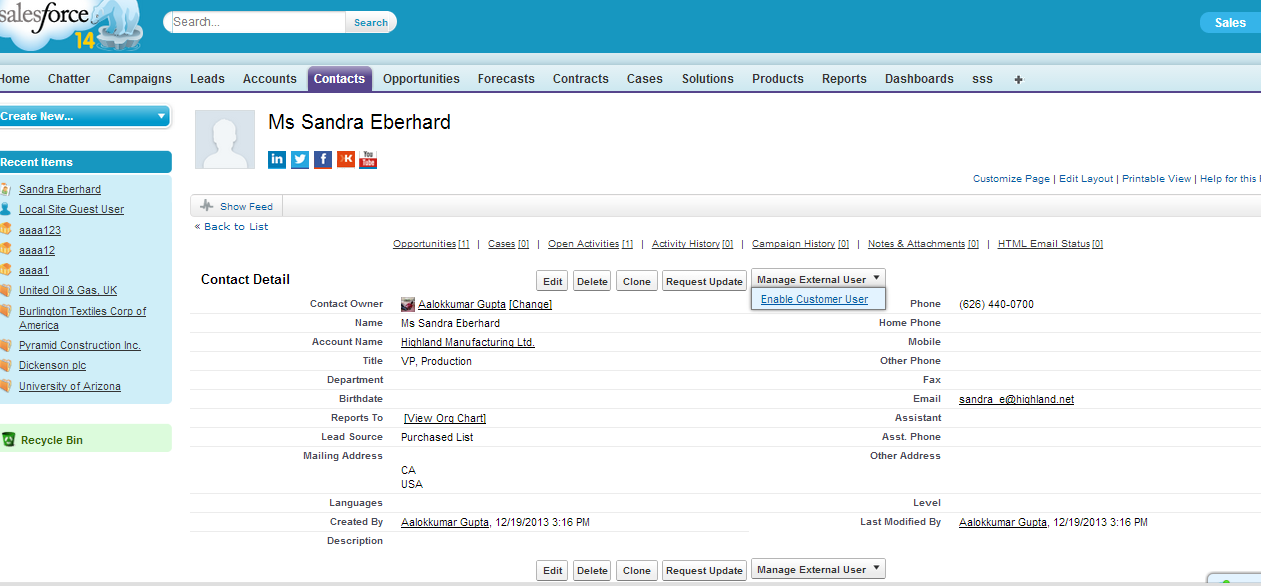
Step 8 :- Activate Contact to User Community
Step 9 :- Change USER License
Step 9 :- User Get A welcome mail
Step 10 :- Once user click on Activation Link He/ She will redirect on a new page to change password
Step 11 :- After that User can use community and use chatter feature in it.
Step 12 :- and other user can participate in conversation.
Step 13 :- continue .... in conversations
Step 15 :- continue .... in conversations
Wednesday, 22 January 2014
Retrieve data using Workbench or take backup of all meta data,classes ,trigger etc. using Workbench
To retrieve data from salesforce using workbench We need Package.xml. This package must contain all information about backup files.
package must be looks like following way :-

Steps to take backup:-
Step 1 :- Click on migration and select Retrieve option.


Step 3:- Click on Retrieve button.


package must be looks like following way :-
Steps to take backup:-
Step 1 :- Click on migration and select Retrieve option.
Step 2:- Upload package.xml and click on Next button
Step 4:- Finally you get Download ZIP File.
You can use pacakge.xml file from Eclipse IDE
Monday, 20 January 2014
Display Account information with similar Industry
/*
*/
<apex:page controller="vf10controller">
<apex:form >
<apex:pageBlock >
<apex:pageBlockButtons >
<apex:commandButton value="Customer Direct Account" action="{!direct}"/>
<apex:commandButton value="Customer - Channel Account" action="{!channel}"/>
</apex:pageBlockButtons>
<apex:pageblocksection title="My account" >
<apex:pageblocktable value="{!acts}" var="row" >
<apex:column >
<apex:commandLink value="{!row.name}" action="{!racts1}" rerender="abc">
<apex:param value="{!row.id}" name="aid"/>
<apex:param value="{!row.name}" name="aname"/>
<apex:param value="{!row.industry}" name="aindustry"/>
</apex:commandLink>
</apex:column>
<apex:column value="{!row.type}"/>
<apex:column value="{!row.industry}"/>
</apex:pageblocktable>
</apex:pageblocksection>
<apex:pageblocksection title="{!$CurrentPage.parameters.aname}" id="abc">
<apex:detail subject="{!$CurrentPage.parameters.aid}"/>
<apex:pageblocktable value="{!racts}" var="row" >
<apex:column value="{!row.Name}"/>
<apex:column value="{!row.type}"/>
<apex:column value="{!row.industry}"/>
</apex:pageblocktable>
</apex:pageblocksection>
</apex:pageBlock>
</apex:form>
</apex:page>
-----------------------------
public class vf10controller {
List<Account> r_acts;
// string type;
List<Account> acts = [SELECT name,type,industry,phone,ownerid FROM Account ];
public List<Account> getacts(){
return acts;
}
public List<Account> getracts(){
return r_acts ;
}
public PageReference direct(){
//type = 'Customer - Direct';
acts = [SELECT name,type,industry,phone,ownerid FROM Account WHERE Type ='Customer - Direct'];
return null;
}
public PageReference channel(){
// type = 'Customer - Channel';
acts = [SELECT name,type,industry,phone,ownerid FROM Account WHERE Type = 'Customer - Channel'];
return null;
}
public pagereference racts1(){
r_acts =[SELECT name,type,industry,phone,ownerid FROM Account WHERE Industry =: ApexPages.CurrentPage().getParameters().get('aindustry') ];
return null;
}
}
--------------------

*/
<apex:page controller="vf10controller">
<apex:form >
<apex:pageBlock >
<apex:pageBlockButtons >
<apex:commandButton value="Customer Direct Account" action="{!direct}"/>
<apex:commandButton value="Customer - Channel Account" action="{!channel}"/>
</apex:pageBlockButtons>
<apex:pageblocksection title="My account" >
<apex:pageblocktable value="{!acts}" var="row" >
<apex:column >
<apex:commandLink value="{!row.name}" action="{!racts1}" rerender="abc">
<apex:param value="{!row.id}" name="aid"/>
<apex:param value="{!row.name}" name="aname"/>
<apex:param value="{!row.industry}" name="aindustry"/>
</apex:commandLink>
</apex:column>
<apex:column value="{!row.type}"/>
<apex:column value="{!row.industry}"/>
</apex:pageblocktable>
</apex:pageblocksection>
<apex:pageblocksection title="{!$CurrentPage.parameters.aname}" id="abc">
<apex:detail subject="{!$CurrentPage.parameters.aid}"/>
<apex:pageblocktable value="{!racts}" var="row" >
<apex:column value="{!row.Name}"/>
<apex:column value="{!row.type}"/>
<apex:column value="{!row.industry}"/>
</apex:pageblocktable>
</apex:pageblocksection>
</apex:pageBlock>
</apex:form>
</apex:page>
-----------------------------
public class vf10controller {
List<Account> r_acts;
// string type;
List<Account> acts = [SELECT name,type,industry,phone,ownerid FROM Account ];
public List<Account> getacts(){
return acts;
}
public List<Account> getracts(){
return r_acts ;
}
public PageReference direct(){
//type = 'Customer - Direct';
acts = [SELECT name,type,industry,phone,ownerid FROM Account WHERE Type ='Customer - Direct'];
return null;
}
public PageReference channel(){
// type = 'Customer - Channel';
acts = [SELECT name,type,industry,phone,ownerid FROM Account WHERE Type = 'Customer - Channel'];
return null;
}
public pagereference racts1(){
r_acts =[SELECT name,type,industry,phone,ownerid FROM Account WHERE Industry =: ApexPages.CurrentPage().getParameters().get('aindustry') ];
return null;
}
}
--------------------
display detail using visualforce page and Ajax
<apex:page standardController="Account" recordSetVar="acts" sidebar="false">
<apex:form id="form">
<apex:pageBlock title="Account info">
<apex:pageblockSection columns="2">
<apex:pageblocktable value="{!acts}" var="a">
<apex:column >
<apex:commandLink value="{!a.name}" rerender="abc" >
<apex:param name="aid" value="{!a.id}" />
<apex:param name="aname" value="{!a.name}" />
</apex:commandLink>
</apex:column>
<apex:column value="{!a.type}"/>
</apex:pageblocktable>
<apex:pageblockSection id="abc" title="{!$CurrentPage.parameters.aname}">
<apex:detail subject="{!$CurrentPage.parameters.aid}" relatedList="false"/>
</apex:pageblockSection>
</apex:pageblockSection>
</apex:pageBlock>
</apex:form>
</apex:page>
<apex:form id="form">
<apex:pageBlock title="Account info">
<apex:pageblockSection columns="2">
<apex:pageblocktable value="{!acts}" var="a">
<apex:column >
<apex:commandLink value="{!a.name}" rerender="abc" >
<apex:param name="aid" value="{!a.id}" />
<apex:param name="aname" value="{!a.name}" />
</apex:commandLink>
</apex:column>
<apex:column value="{!a.type}"/>
</apex:pageblocktable>
<apex:pageblockSection id="abc" title="{!$CurrentPage.parameters.aname}">
<apex:detail subject="{!$CurrentPage.parameters.aid}" relatedList="false"/>
</apex:pageblockSection>
</apex:pageblockSection>
</apex:pageBlock>
</apex:form>
</apex:page>
Use Tab in Visualforce page :Salesforce
/*
pass account id in url e.g. https://c.ap1.visual.force.com/apex/vf4?id=0019000000lw1tK
*/
<apex:page standardController="account">
<apex:pageBlock title="{!account.Name}">
<apex:tabPanel id="tabpanel">
<apex:tab Label="Details" reRender="tabpanel" switchType="ajax">
<apex:detail relatedList="false"/>
</apex:tab>
<apex:tab Label="Contact" reRender="tabpanel" switchType="ajax">
<apex:relatedList list="Contacts"/>/>
</apex:tab>
<apex:tab label="opportunities" reRender="tabpanel" switchType="ajax" >
<apex:detail relatedList="false"/>
</apex:tab>
<apex:tab label="cases" reRender="tabpanel" switchType="ajax">
<apex:detail relatedList="false"/>
</apex:tab>
</apex:tabPanel>
</apex:pageBlock>
</apex:page>
pass account id in url e.g. https://c.ap1.visual.force.com/apex/vf4?id=0019000000lw1tK
*/
<apex:page standardController="account">
<apex:pageBlock title="{!account.Name}">
<apex:tabPanel id="tabpanel">
<apex:tab Label="Details" reRender="tabpanel" switchType="ajax">
<apex:detail relatedList="false"/>
</apex:tab>
<apex:tab Label="Contact" reRender="tabpanel" switchType="ajax">
<apex:relatedList list="Contacts"/>/>
</apex:tab>
<apex:tab label="opportunities" reRender="tabpanel" switchType="ajax" >
<apex:detail relatedList="false"/>
</apex:tab>
<apex:tab label="cases" reRender="tabpanel" switchType="ajax">
<apex:detail relatedList="false"/>
</apex:tab>
</apex:tabPanel>
</apex:pageBlock>
</apex:page>
Subscribe to:
Posts (Atom)